

Upload Your UV DTF Gang Sheet
Upload Your UV DTF Gang Sheet
$0.04 / sq in
Lowest price per square inch: sheets 156 in and longer.
Next: upload your finished sheet file, check the preview, then add it to your cart.
Need help with your file? files@transfer305.com · WhatsApp (305) 801-8267
- No minimums
- Same-day production: orders approved by 2 PM ET, Mon–Fri
- Printed in Miami
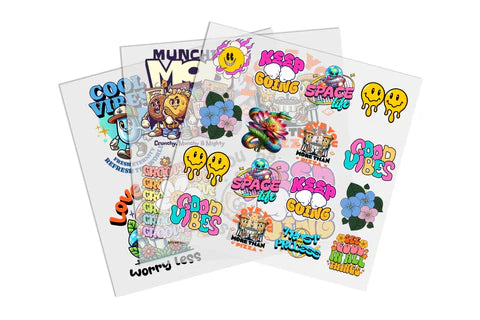
What is a UV DTF gang sheet upload?
A UV DTF gang sheet upload lets you order a finished UV-DTF layout as one production file. Choose a sheet size, upload your completed canvas, and Transfer305 prints it as you approved it. UV-DTF gang sheets are $0.04 per sq in, with no minimums and no setup fees.
Transfer305 is the online store of DTF Chroma Zone, our production facility at 10775 SW 190th St Unit 7, Miami, FL 33157. We are a veteran-owned business, and we ship nationwide.
How much do UV DTF gang sheets cost?
Standard UV-DTF pricing is $0.04 per sq in, with no minimum. UV DTF gang sheets are 23 in wide, and you pick a fixed length from 6 in to 300 in. Prices start at $5.99 for a 23 × 6 in sheet, and a 23 × 24 in sheet is $22.49. The product form shows the exact price for the length you select. Shipping is calculated at checkout.
When should I upload a finished UV DTF gang sheet?
Upload a finished sheet when every layout decision is already made. The canvas size, artwork dimensions, copies, spacing, orientation, background, and final composition should already be approved. Upload the sheet only when it is ready to be treated as the production decision.
If your designs are still separate, use the UV DTF gang sheet builder. If the number of decals should set the sheet length, build a custom UV DTF gang sheet on a rolling canvas. If you need one decal at a time, order UV-DTF transfers by size.
Direct upload also reduces interpretation. Transfer305 can flag an obvious issue, but this route is not a redesign service. You approve the canvas, spelling, copies, dimensions, design content, and layout. If a correction is needed, update the source file and export a new final sheet.
How is UV-DTF different from standard DTF?
UV-DTF is a decal-style transfer for smooth hard surfaces, and standard DTF is a heat transfer for garments and fabric. UV-DTF means UV direct-to-film: the design is printed on a film carrier as a ready-to-apply decal. It goes on glass, acrylic, plastic, metal, packaging, drinkware, signs, equipment, and product labels. UV-DTF is not for fabric.
UV-DTF needs no heat press. You align the decal, press it onto the surface, and remove the carrier. Standard DTF is made for cotton, polyester, and blends, and it is applied with a heat press.
| Feature | UV-DTF gang sheet | Standard DTF gang sheet |
|---|---|---|
| Use it on | Smooth hard surfaces: glass, acrylic, plastic, metal, packaging, drinkware, signs, equipment, product labels | Garments and fabric: cotton, polyester, blends |
| Application | Press onto the surface; no heat press | Heat press |
| Sheet width | 23 in | 24.5 in |
| Standard rate | $0.04 per sq in | $0.02 per sq in |
Decorating apparel instead? Order DTF transfers for garments and fabric.
What should my UV DTF gang sheet file include?
The UV-DTF upload workflow is for a sheet that is fully arranged, dimensioned, and approved. The production team should not need to resize decals, add copies, remove backgrounds, or determine which object receives each design. The file canvas must match the purchased production size.
UV-DTF sheet checklist
- Canvas dimensions match the selected product.
- All decals stay inside the canvas.
- No artwork overlaps.
- Cutting and handling space is deliberate.
- Quantities and spelling are final.
- No crop marks, registration marks, color bars, or unused objects remain.
- Linked assets are embedded and fonts are outlined where applicable.

Final-file check
| Final-file check | Pass condition | Risk if skipped |
|---|---|---|
| Canvas | Matches purchased width and length. | Automatic scaling changes every decal size. |
| Copies | Matches approved quantity list. | Missing decals appear after production. |
| Edges and white | Intentional white remains; exterior is truly transparent. | White boxes or missing white elements print. |
| Object mapping | Every size/orientation has an identified use. | Application crew cannot match decals to objects. |
How do I keep white artwork and transparent areas correct?
White artwork and transparent areas are different. Keep white letters, highlights, eyes, clouds, and other elements that must print. A checkerboard graphic is not transparency. Inspect semi-transparent edges, glows, shadows, and tiny isolated details.
Keep the editable source and export a final production file from the original design application. A screenshot or compressed preview can hide transparency and resolution problems. Open the exported file again and confirm that the dimensions, artwork, white elements, and transparent areas survived the export. For file setup help, read our DTF artwork requirements or email sales@transfer305.com.
How do I upload and order my sheet?
- Choose the sheet size that matches your finished file. UV-DTF sheets are 23 in wide.
- Choose Upload a Gang Sheet in the product form and add your finished production file.
- Check the size, spelling, copies, and layout, then approve the file as the production decision.
- Add the sheet to your cart and check out. Shipping is calculated at checkout.
- Pick up at 10775 SW 190th St Unit 7, Miami, FL 33157 once your order is confirmed ready, or have it shipped.
Qualifying, paid, approved, print-ready weekday orders placed by 2:00 PM ET can receive same-day production, subject to capacity; same-day production is not same-day delivery. Pickup or carrier transit begins after production is complete.
Can I use a UV-DTF gang sheet on any surface?
No. UV-DTF is designed for compatible smooth hard surfaces, not for apparel. A well-prepared production file cannot prove that the final object is compatible. The buyer is responsible for selecting and testing the actual surface, including coatings, texture, flexibility, curvature, cleaning, moisture, and use conditions.
Test unfamiliar coatings, textures, curves, dishwasher exposure, chemicals, abrasion, and outdoor use. When the project includes an unfamiliar coating or object, run a controlled sample before ordering the full quantity. Record the surface preparation and application method used in the test so the production run can be applied consistently. The upload workflow prints the canvas; it does not confirm that the object is compatible.
How do I apply a UV-DTF decal?
- Clean the surface according to the object requirements.
- Allow the surface to dry completely before application.
- Align the carrier before committing pressure.
- Apply controlled pressure across the complete decal.
- Remove the carrier carefully and inspect edge adhesion.
What do agencies and print shops need to know?
Finished-sheet upload gives agencies and print shops direct control of the layout. Use a clear customer/job/version naming system and retain the order reference. If one logo, date, quantity, or decal size changes, create a revised sheet rather than sending several files named “final.”
Use finished-sheet upload when the client or designer owns the complete UV-DTF layout and wants it produced without redesign.
For Upload a Premade UV-DTF Gang Sheet, production is completed through DTF Chroma Zone, the G7 Master Qualified facility (ID 534486), with process leadership by G7+ Expert Michael Solier (ID 528257).
Frequently asked questions
Ready to upload your UV DTF gang sheet?
Choose your sheet size at the top of this page and upload your finished file. Still arranging designs? Use the UV DTF gang sheet builder. Want a second look before you order? Send the file on WhatsApp, call (305) 801-8267, or email sales@transfer305.com.
Ready to move forward?
Choose the workflow that matches the real stage of your artwork, or send the file through WhatsApp before guessing.
Reliable DTF & UV-DTF Transfers Made Simple
Professional print quality, fast production, nationwide shipping, and helpful support for every order.
G7 Master Qualified
Professional color accuracy and consistent print quality.
See credentials →Same-Day Production
Orders approved before 2:00 PM ET qualify for faster turnaround.
Shipping & production →Nationwide Shipping
Fast shipping for custom DTF and UV-DTF transfer orders.
Shipping policy →Expert Support
Need help with artwork, gang sheets, or orders? Our team is ready to help.
Contact us →